
Someone reposts a video and you want a copy of it. Simple enough, right? Except the save button does not always behave the way it does on a normal post. Sometimes it is missing entirely. Sometimes the file that lands has a watermark slapped across it that nobody asked for. A repost is not quite the same animal as a video someone posted themselves. Knowing that one detail makes the rest of this a lot less confusing.
Where Reposts Actually Live
Reposts sit apart from a person’s main TikTok grid. TikTok gives them a tab of their own on a profile, usually marked with a small icon of two arrows chasing each other. Tap into it and every video that person shared from someone else’s account shows up there instead of mixed into their regular posts. That separation is part of why saving one is not always as simple as tapping a button like a normal post.
Saving a Repost From Inside the App
The in-app method still works for a lot of reposts.
- Open the profile and find the repost tab first.
- Tap the video, then hit the share arrow sitting on the right edge of the screen.
- Save Video should show up in the menu that opens.
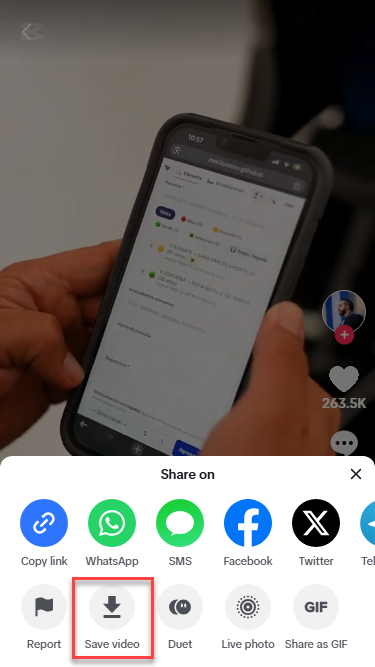
- Tap it and let TikTok drop the file into your camera roll.
That covers plenty of reposts. It does not cover every single one though.
Why the In-App Save Sometimes Falls Short
Here is the catch. A repost is still chained to the original video, so whatever the original creator decided about downloads carries over to it. Turned off on their end? Then the save button on the repost is dead too, no matter who reshared it. Even on a good day, saving usually hands you a file with a watermark and the reposting account’s handle stamped right over the footage, nowhere close to a clean copy. Every once in a while a repost only opens a small preview window, so tapping share just gives ways to forward the link instead of an actual download.
Downloading Reposts From a Browser
A TikTok Repost Viewer and Downloader skips the app entirely and works straight from a browser tab instead.
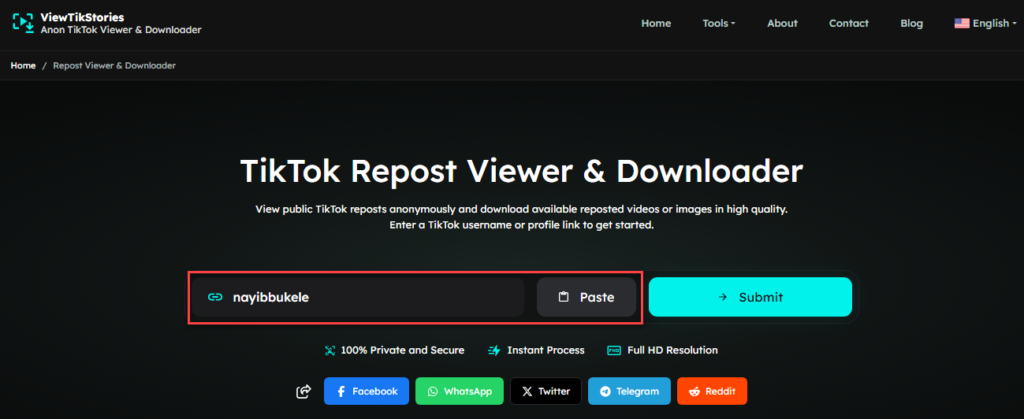
- Open a repost viewer tool and type in the username of the account that shared the repost.
- Submit it and let the reposts load onto the screen.
- Find the video you want, tap it to preview or hit download to save it.
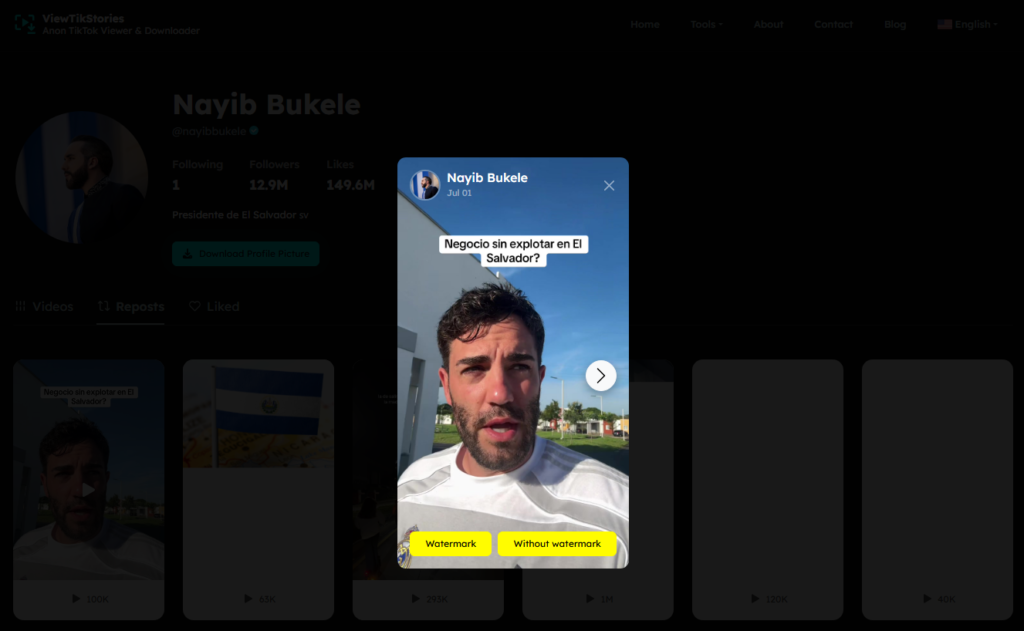
- What comes out the other end is a plain MP4, usually clean of any watermark since the file gets pulled from the source instead of TikTok’s own save process.
Skipping the app is honestly the quickest route todownload reposted TikTok videos most of the time. It also dodges every limit the in-app method runs into.
Got the Direct Link Already?
Maybe you already grabbed the post link straight from the share menu before any of this started. A plain TikTok Video Downloader handles that job just fine. Drop the link in, submit it, then choose whether the watermark stays or gets stripped off. Handy as a backup too, especially on days the repost tab takes forever to load.
A Few Things Worth Knowing
Private accounts keep their reposts locked away from anyone who is not an approved follower. Neither the app nor a browser tool can reach those, so a private profile is simply out of range no matter which method gets tried. Final quality also depends entirely on what the original creator uploaded in the first place, so a blurry original stays blurry regardless of the download method. One more thing to remember. A repost can vanish the second the account un-reposts it, so grabbing a copy while it is still there is really the only shot at keeping it. Worth remembering if there is a specific one that actually matters to you.
FAQs
Can I download a repost if the original creator disabled downloads?
No. The download setting belongs to the original video. If the creator switched it off there, saving through the repost will not work either.
Will downloading a repost notify the person who shared it?
No. Saving a video, whether through the app or a browser tool, does not send any alert to the account that reposted it.
Does the downloaded file keep the original sound?
Yes. The audio stays attached and in sync the same way it plays inside TikTok.
Can I download reposts from a private account?
No. Private accounts restrict everything including reposts to approved followers only. No tool gets around that limit.
What if the repost tab shows nothing at all?
Nine times out of ten that means nothing has been reposted yet, or the profile sits behind a private setting. Give it a refresh or try again in a few minutes since it occasionally just needs a second attempt.
Do you have to follow someone before downloading their reposts?
Nope. Publicity is all that matters here. Reposts stay viewable and downloadable without a follow and without ever opening TikTok yourself.
Does it matter how old the repost is?
Barely. If the repost is still sitting on the profile, age does not block either method from reaching it, whether it went up yesterday or months back.
Before You Go
None of this is complicated once you know where the app hits a wall. Give the in-app save a shot first if that feels like less hassle. Just keep a TikTok Repost Viewer and Downloader bookmarked instead for the times a watermark or a disabled setting gets in the way. Either route puts the file on your device in well under a minute.