
So you found the TikTok clip you actually want to keep this time. You download it the regular way and there it is, a little bouncing logo and username stamped right across the middle of the screen for the whole video. That watermark lands on every save you make straight from the app unless you go around it and the workaround takes less time than scrolling to your next video in the feed.
Why Every Saved Clip Gets Stamped
TikTok drops its logo and the poster’s username onto anything you save straight from the app. It works out as free advertising for TikTok, since any clip that gets reshared somewhere else still points right back to where it came from. That part is great for TikTok and not so great for you if you wanted a clean file for editing, reposting on another app or just keeping without a logo drifting across the frame the whole time it plays. Screen recording gets around none of this either, since it just captures whatever is already on your display and usually drops the resolution a notch in the process.
The One Thing You Need First
The downloader is designed for publicly accessible TikTok posts. It cannot retrieve content from private accounts, deleted posts or links that are no longer publicly available. Private videos stay locked to approved followers only and no tool reaches past that wall no matter how it’s built or how good it claims to be. Grab the full post link too, not a shortened share link and not something typed out by hand from the address bar. The complete URL from the Share button is what actually works every time.
Saving a Clean Copy, Step by Step
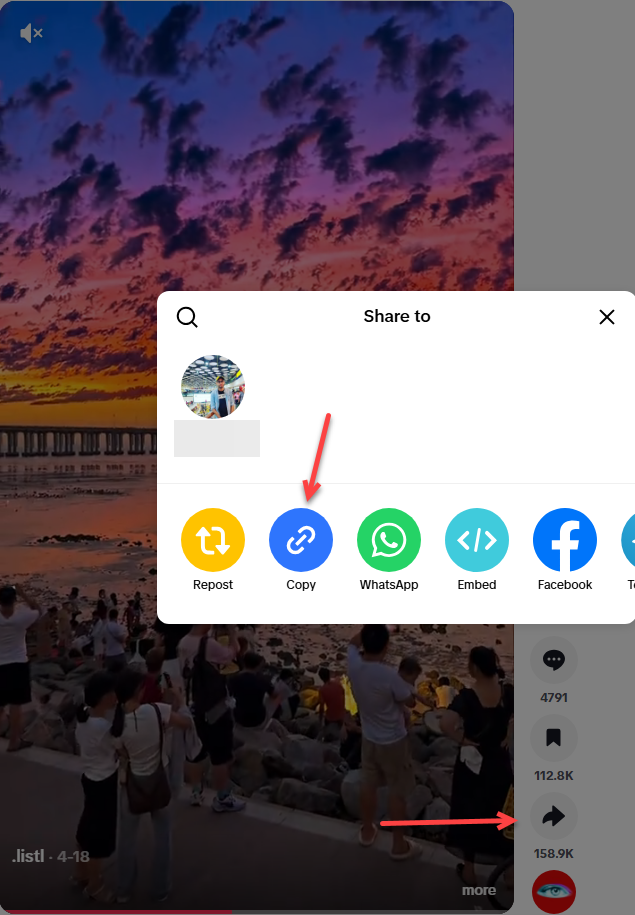
- Open TikTok and find the video you want, then tap Share and pick Copy so the full post URL sits on your clipboard.
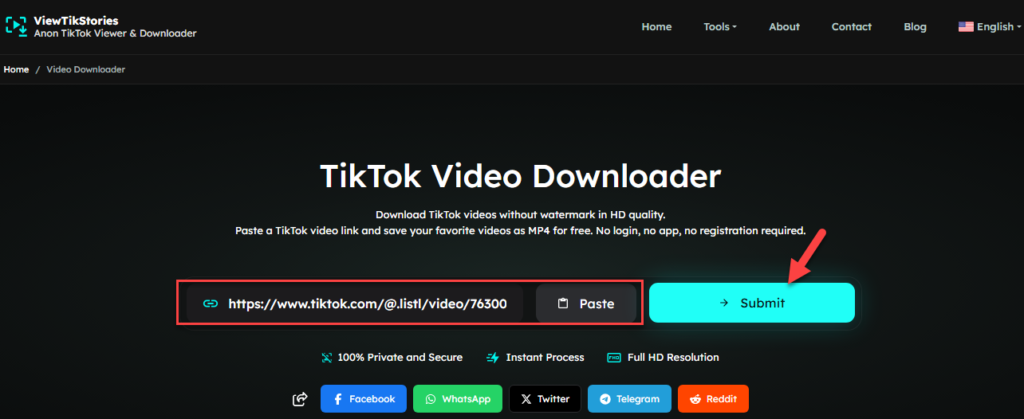
- Head over to aTikTok Video Downloader without watermark, paste the link into the box and hit submit.
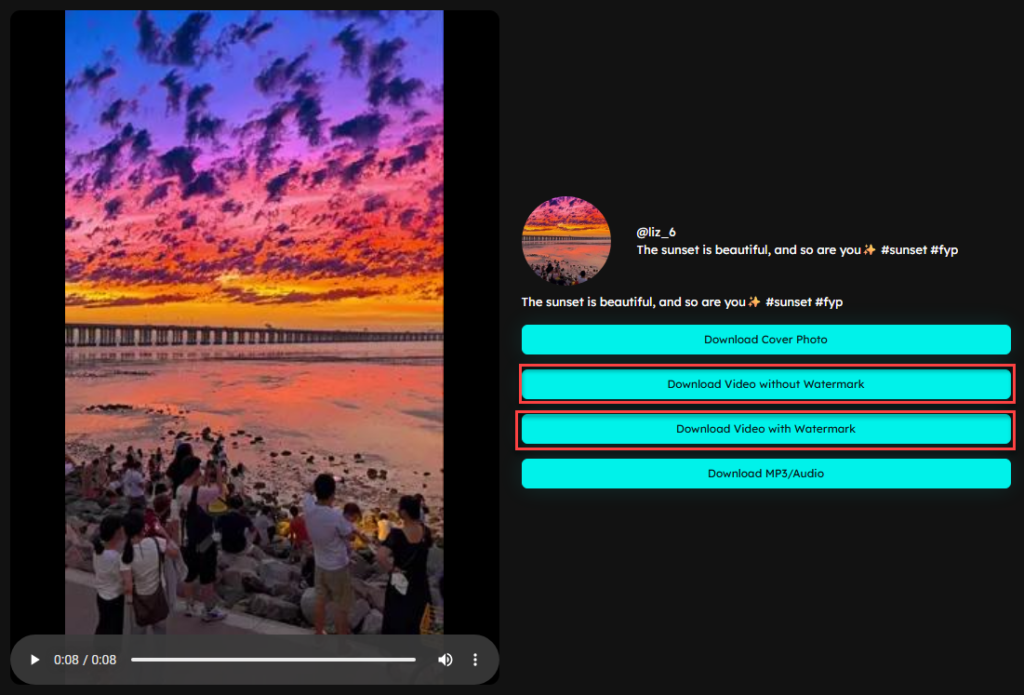
- Give it a couple seconds and the matching video loads right on the screen, no login and no waiting in a queue.
- Pick the download option that skips the watermark and a clean MP4 saves straight to your device at whatever resolution it was uploaded in.
Doing the Same Thing on Your Phone or Computer
None of this changes much depending on what you’re holding. On an iPhone, open Safari, paste the link and the video drops into your camera roll with no app to fetch from the store first. On Android, Chrome handles it the same way and the file lands in your gallery in a tap. Windows and Mac both work fine through Chrome, Edge or Safari, with the MP4 saving straight to wherever your downloads folder happens to be. Nothing about the process changes much from one device to the next, which is really the whole point of running this in a browser instead of a separate app for every platform.
When Something Doesn’t Work
- The screen stays blank after you submit: the link is probably broken or the account went private since you copied it. Copy it again straight from the Share button and give it another try.
- The watermark is still showing up: an easy mix-up, since the results screen usually gives you two buttons and one of them keeps the logo on purpose for people who actually want it there.
- The file won’t open once it saves: this is rare, but running the download again from scratch usually clears it right up.
- Nothing loads no matter what you paste: double check that you copied a full post link and not a profile link or a shortened one, since those don’t carry enough information for the tool to pull the video.
FAQs
Do I need to install anything to use this?
No. It runs in your browser, so there’s no app to download and no extension to add first.
Will the video lose quality along the way?
Not from this end. The download pulls the original file rather than recording your screen, so quality depends on what the creator uploaded rather than anything lost during the process.
Does the creator find out I downloaded their video?
No. Nothing about the download pings the original account or shows up anywhere in their notifications.
Can I save someone’s private TikTok this way?
No. Private accounts only show their content to approved followers and that stays true no matter which tool you’re using.
Does the sound stay attached to the file?
Yes, the audio saves right along with the video and stays in sync the whole way through.
What about slideshow posts with photos instead of video?
Those work too. The images save through the same steps a regular video download would take.
Can I download more than one video at a time?
Not in one go. Each link needs its own submit though there’s no cap on how many separate downloads you run in a session.
Quick Recap
Getting a watermark free TikTok video really comes down to three things: a public account, the full post link and picking the right button once the video loads on screen. Skip any one of those and you’ll either hit a dead end or end up with the same stamped copy you were trying to avoid in the first place. Once you’ve done it a single time, the whole thing takes under a minute from copying the link to having the saved file sitting on your device.